OK, so now we have two new cabling standards to provide more bandwidth for ever increasing megabit hungry networks . . .
. . . and to further complicate the lives of cabling engineers worldwide!
It would seem that existing Cat 6 and 7 cabling systems have become redundant
before they even took off and have been replaced by Augmented Category 6 (Cat
6A) and Augmented Category 7 (Cat 7A).
criteria for 10 Gigabit applications, whilst Cat 7A is a 1000MHz cabling solution which has been
developed to support the emerging 40 Gigabit Ethernet systems.
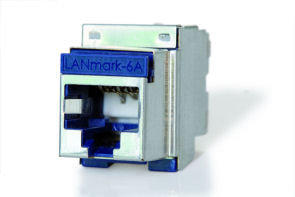
Image courtesy of Nexans
The TIA/EIA have stated that 10GbaseT should be possible over existing Cat 6 installations up to 37m,
and if the environment is not susceptible to Alien Crosstalk noise, even up to 55m. Running 10 Gigabit
Ethernet over Cat 6 is said to be unreliable at more than approximately 55m, so the development of Cat
6A was driven by the need to reliably run 10GBaseT up to 100m.
Here are the bandwidth and construction comparisons for the various types of network cables:
Cat 5e up to 100MHz - UTP or FTP
Cat 6 up to 250MHz - UTP, FTP or SFTP
Cat 6a up to 500MHz - UTP, FTP or SFTP
Cat 7 up to 600MHz - SFTP
Cat 7a up to 1000MHz - SFTP
Key to cable construction:
UTP - Unshielded Twisted Pair
FTP - Foil screened Twisted Pair
SFTP - Shielded and Foil screened Twisted Pair (an overall braided screen within which the individual
pairs have a foil screen)
my own trumpet but I've been banging on about this for over 10 years! And it's only just being
considered as an important parameter for signal transmissions.
Alien Crosstalk is the electro-magnetic induction of noise from adjacent cables in a loom, not just from
the pairs within a cables own jacket. This happens because an alternating current flow produces
electromagnetic fields around a cable, this field then induces a current flow in adjacent cables. The
strength of the field increases with signal frequency and because the speed of data transmissions is
ever increasing, Alien Crosstalk is becoming a problem.
The times I have tried to convince people that the more untidy a cabling system is the better it is for the
transmission of data. Of course, I do concede that a new cabling installation with all of the looms tied in
neat bundles of perfectly parallel cables, does provide the customer with more confidence in the ability
of the installation engineers. Never the less, it remains a fact that untidy is better. Maybe a compromise
would be to plait the cables . . . . . joking!!!
Rant over . . . now where was I ?
Oh yes . . . eliminating Alien Crosstalk.
is being sent over the cable so they cancel out any crosstalk which is known to be from a different pair.
With Alien Crosstalk however, the receiving hardware has no idea what data is being sent on a different
cable so eliminating Alien Crosstalk is not possible using DSP noise cancelling techniques.
One of the more effective ways to eliminate Alien Crosstalk is to use a shielded cabling system, this will
drain away any interference coming from within a cable and shield against interference from adjacent
cables. Another consideration is that cables are more susceptible to crosstalk the nearer you get to the
point of termination, so care within the cabinet to keep the cables separated as far as possible at the
back of the patch panels will further reduce the risk of interference. The patch leads themselves can
contribute to Alien Crosstalk so not being so neat in this area could be advantageous, also the use of
screened patch leads will further reduce Alien crosstalk, even on a UTP cabling plant.
signals down some of the other cables in the same wiring loom. Then we need to measure any crosstalk
coming from the other cables over the full frequency spectrum of the test range. A full explaination on
this can be found in the eBook.
So we have Cat 6A running at 500MHz and capable of supporting 10 gigabit Ethernet, surely this is now
fast enough for any desktop application? Well, yes it is . . . . in theory!
I read an article years ago by Paul Andres who was at the time the Managing Director of MOD-TAP
World Corporation. In it he discussed the 'Need For Speed' and went into great detail about the fastest
connection speed that a PC could possibly use given that the end user, a human, could concurrently
handle through our senses. High definition video, sounds, voice traffic, file transfer rates, etc. The
conclusion he came to then (probably late 1990's) was that 100MHz would just about be enough, and he
had a good point. So in theory Cat 5e would have just about been enough bandwidth, Cat 6 is definitely
enough and Cat 6A would be more than we could possibly handle. So why do we need Cat 7A and
1000MHz? Well, we as humans don't, not to the desk anyway. But server rooms, data centers and
backbone cabling will be needing as much bandwidth as we can possibly squeeze from a piece of
copper. Faster connections between networks mean we can serve more of those humans at the ends of
the networks per cable. So lets look at Cat 7A.
60603-7-71, also available from other manufacturers) and is known as the GG45. This type is
backwards compatible with the RJ45 by the clever use of switch within the jack that changes the pole
layout from 8 contacts in a line (as in the RJ45), to four pairs of contacts at the corners. Ingenious!
Image courtesy of Nexans
This means that the existing RJ45 type leads and hardware can be used on the cabling plant, and when
the hardware is updated all that is required to go to full 1000MHz is to change the patch leads. This
seems to be an ideal solution as they are capable of pair isolation for the emerging high-speed
technologies. There is a wealth of information for the GG45 on the Nexans website.
Image courtesy of Nexans
The other type of connector is the 'non-backwards compatible' version often referred to as 'TERA' (IEC
61076-3-104). These have the contacts arranged as four pairs of contacts at the four corners to achieve
maximum pair isolation. This type also has a neat trick, the pairs can be used individually for different
applications, so by using single pair, two pair or all four pair plugs, multiple applications can be
supported over one cable. This obviously has a cost benefit, especially when cabling to the desk as one
cable can support 100Mb Ethernet, a phone and a video channel. For more information go to the
Siemons website and look for their info on Category 7/7A - TERA.
The ISO recommends the GG45 as the preferred connector for Data Centre installations, but allows the
'TERA' to be used where cable sharing is more important than backwards compatibility.
of the ways being discussed is to reduce the need for DSP, this is quite a considerable overhead on
signal transmissions and adds to the heat generated by all networking equipment within the data center.
The theory is, that a good quality fully shielded cabling system is not as susceptible to crosstalk and
alien crosstalk, so it will require less noise cancellation. Less noise cancellation means less electronics.
Less electronics means less heat. Less heat means
less air conditioning. Less air conditioning means
less power consumption. Less power consumption
means a happier planet!
classifications that it can be somewhat confusing to
understand what is what. Cat 6/7, Cat 6A/7A, Class
E or F, EA or FA, UTP, FTP, SFTP, U/UTP? . . . . .
Uh! . . . . . Clarification is needed. More on this in the
eBook
ever increasing megabit hungry networks . . .
. . . and to further complicate the lives of cabling engineers worldwide!
It would seem that existing Cat 6 and 7 cabling systems have become redundant
before they even took off and have been replaced by Augmented Category 6 (Cat
6A) and Augmented Category 7 (Cat 7A).
criteria for 10 Gigabit applications, whilst Cat 7A is a 1000MHz cabling solution which has been
developed to support the emerging 40 Gigabit Ethernet systems.
Image courtesy of Nexans
The TIA/EIA have stated that 10GbaseT should be possible over existing Cat 6 installations up to 37m,
and if the environment is not susceptible to Alien Crosstalk noise, even up to 55m. Running 10 Gigabit
Ethernet over Cat 6 is said to be unreliable at more than approximately 55m, so the development of Cat
6A was driven by the need to reliably run 10GBaseT up to 100m.
Here are the bandwidth and construction comparisons for the various types of network cables:
Cat 5e up to 100MHz - UTP or FTP
Cat 6 up to 250MHz - UTP, FTP or SFTP
Cat 6a up to 500MHz - UTP, FTP or SFTP
Cat 7 up to 600MHz - SFTP
Cat 7a up to 1000MHz - SFTP
Key to cable construction:
UTP - Unshielded Twisted Pair
FTP - Foil screened Twisted Pair
SFTP - Shielded and Foil screened Twisted Pair (an overall braided screen within which the individual
pairs have a foil screen)
my own trumpet but I've been banging on about this for over 10 years! And it's only just being
considered as an important parameter for signal transmissions.
Alien Crosstalk is the electro-magnetic induction of noise from adjacent cables in a loom, not just from
the pairs within a cables own jacket. This happens because an alternating current flow produces
electromagnetic fields around a cable, this field then induces a current flow in adjacent cables. The
strength of the field increases with signal frequency and because the speed of data transmissions is
ever increasing, Alien Crosstalk is becoming a problem.
The times I have tried to convince people that the more untidy a cabling system is the better it is for the
transmission of data. Of course, I do concede that a new cabling installation with all of the looms tied in
neat bundles of perfectly parallel cables, does provide the customer with more confidence in the ability
of the installation engineers. Never the less, it remains a fact that untidy is better. Maybe a compromise
would be to plait the cables . . . . . joking!!!
Rant over . . . now where was I ?
Oh yes . . . eliminating Alien Crosstalk.
is being sent over the cable so they cancel out any crosstalk which is known to be from a different pair.
With Alien Crosstalk however, the receiving hardware has no idea what data is being sent on a different
cable so eliminating Alien Crosstalk is not possible using DSP noise cancelling techniques.
One of the more effective ways to eliminate Alien Crosstalk is to use a shielded cabling system, this will
drain away any interference coming from within a cable and shield against interference from adjacent
cables. Another consideration is that cables are more susceptible to crosstalk the nearer you get to the
point of termination, so care within the cabinet to keep the cables separated as far as possible at the
back of the patch panels will further reduce the risk of interference. The patch leads themselves can
contribute to Alien Crosstalk so not being so neat in this area could be advantageous, also the use of
screened patch leads will further reduce Alien crosstalk, even on a UTP cabling plant.
signals down some of the other cables in the same wiring loom. Then we need to measure any crosstalk
coming from the other cables over the full frequency spectrum of the test range. A full explaination on
this can be found in the eBook.
So we have Cat 6A running at 500MHz and capable of supporting 10 gigabit Ethernet, surely this is now
fast enough for any desktop application? Well, yes it is . . . . in theory!
I read an article years ago by Paul Andres who was at the time the Managing Director of MOD-TAP
World Corporation. In it he discussed the 'Need For Speed' and went into great detail about the fastest
connection speed that a PC could possibly use given that the end user, a human, could concurrently
handle through our senses. High definition video, sounds, voice traffic, file transfer rates, etc. The
conclusion he came to then (probably late 1990's) was that 100MHz would just about be enough, and he
had a good point. So in theory Cat 5e would have just about been enough bandwidth, Cat 6 is definitely
enough and Cat 6A would be more than we could possibly handle. So why do we need Cat 7A and
1000MHz? Well, we as humans don't, not to the desk anyway. But server rooms, data centers and
backbone cabling will be needing as much bandwidth as we can possibly squeeze from a piece of
copper. Faster connections between networks mean we can serve more of those humans at the ends of
the networks per cable. So lets look at Cat 7A.
60603-7-71, also available from other manufacturers) and is known as the GG45. This type is
backwards compatible with the RJ45 by the clever use of switch within the jack that changes the pole
layout from 8 contacts in a line (as in the RJ45), to four pairs of contacts at the corners. Ingenious!
Image courtesy of Nexans
This means that the existing RJ45 type leads and hardware can be used on the cabling plant, and when
the hardware is updated all that is required to go to full 1000MHz is to change the patch leads. This
seems to be an ideal solution as they are capable of pair isolation for the emerging high-speed
technologies. There is a wealth of information for the GG45 on the Nexans website.
Image courtesy of Nexans
The other type of connector is the 'non-backwards compatible' version often referred to as 'TERA' (IEC
61076-3-104). These have the contacts arranged as four pairs of contacts at the four corners to achieve
maximum pair isolation. This type also has a neat trick, the pairs can be used individually for different
applications, so by using single pair, two pair or all four pair plugs, multiple applications can be
supported over one cable. This obviously has a cost benefit, especially when cabling to the desk as one
cable can support 100Mb Ethernet, a phone and a video channel. For more information go to the
Siemons website and look for their info on Category 7/7A - TERA.
The ISO recommends the GG45 as the preferred connector for Data Centre installations, but allows the
'TERA' to be used where cable sharing is more important than backwards compatibility.
of the ways being discussed is to reduce the need for DSP, this is quite a considerable overhead on
signal transmissions and adds to the heat generated by all networking equipment within the data center.
The theory is, that a good quality fully shielded cabling system is not as susceptible to crosstalk and
alien crosstalk, so it will require less noise cancellation. Less noise cancellation means less electronics.
Less electronics means less heat. Less heat means
less air conditioning. Less air conditioning means
less power consumption. Less power consumption
means a happier planet!
classifications that it can be somewhat confusing to
understand what is what. Cat 6/7, Cat 6A/7A, Class
E or F, EA or FA, UTP, FTP, SFTP, U/UTP? . . . . .
Uh! . . . . . Clarification is needed. More on this in the
eBook
ever increasing megabit hungry networks . . .
. . . and to further complicate the lives of cabling engineers worldwide!
It would seem that existing Cat 6 and 7 cabling systems have become redundant
before they even took off and have been replaced by Augmented Category 6 (Cat
6A) and Augmented Category 7 (Cat 7A).
Cat 6A
Cat 6A is a 500MHz cabling system which can be UTP, FTP or SFTP and was designed to meet the
criteria for 10 Gigabit applications, whilst Cat 7A is a 1000MHz cabling solution which has been
developed to support the emerging 40 Gigabit Ethernet systems.
Image courtesy of Nexans
The TIA/EIA have stated that 10GbaseT should be possible over existing Cat 6 installations up to 37m,
and if the environment is not susceptible to Alien Crosstalk noise, even up to 55m. Running 10 Gigabit
Ethernet over Cat 6 is said to be unreliable at more than approximately 55m, so the development of Cat
6A was driven by the need to reliably run 10GBaseT up to 100m.
Here are the bandwidth and construction comparisons for the various types of network cables:
Cat 5e up to 100MHz - UTP or FTP
Cat 6 up to 250MHz - UTP, FTP or SFTP
Cat 6a up to 500MHz - UTP, FTP or SFTP
Cat 7 up to 600MHz - SFTP
Cat 7a up to 1000MHz - SFTP
Key to cable construction:
UTP - Unshielded Twisted Pair
FTP - Foil screened Twisted Pair
SFTP - Shielded and Foil screened Twisted Pair (an overall braided screen within which the individual
pairs have a foil screen)
Testing Cat 6A
The new standards for Cat 6A include testing for the effects of Alien Crosstalk. Now, I don't like to blow
my own trumpet but I've been banging on about this for over 10 years! And it's only just being
considered as an important parameter for signal transmissions.
Alien Crosstalk is the electro-magnetic induction of noise from adjacent cables in a loom, not just from
the pairs within a cables own jacket. This happens because an alternating current flow produces
electromagnetic fields around a cable, this field then induces a current flow in adjacent cables. The
strength of the field increases with signal frequency and because the speed of data transmissions is
ever increasing, Alien Crosstalk is becoming a problem.
The times I have tried to convince people that the more untidy a cabling system is the better it is for the
transmission of data. Of course, I do concede that a new cabling installation with all of the looms tied in
neat bundles of perfectly parallel cables, does provide the customer with more confidence in the ability
of the installation engineers. Never the less, it remains a fact that untidy is better. Maybe a compromise
would be to plait the cables . . . . . joking!!!
Rant over . . . now where was I ?
Oh yes . . . eliminating Alien Crosstalk.
Noise cancellation doesn't work!
Networking hardware at the ends of a cable use digital signal processing (DSP) techniques to cancel out interference from other pairs in the same cable. Transceivers can do this because they know what data
is being sent over the cable so they cancel out any crosstalk which is known to be from a different pair.
With Alien Crosstalk however, the receiving hardware has no idea what data is being sent on a different
cable so eliminating Alien Crosstalk is not possible using DSP noise cancelling techniques.
One of the more effective ways to eliminate Alien Crosstalk is to use a shielded cabling system, this will
drain away any interference coming from within a cable and shield against interference from adjacent
cables. Another consideration is that cables are more susceptible to crosstalk the nearer you get to the
point of termination, so care within the cabinet to keep the cables separated as far as possible at the
back of the patch panels will further reduce the risk of interference. The patch leads themselves can
contribute to Alien Crosstalk so not being so neat in this area could be advantageous, also the use of
screened patch leads will further reduce Alien crosstalk, even on a UTP cabling plant.
How do we test for Alien Crosstalk and certify a cabling system to meet 10 Gigabit
performance?
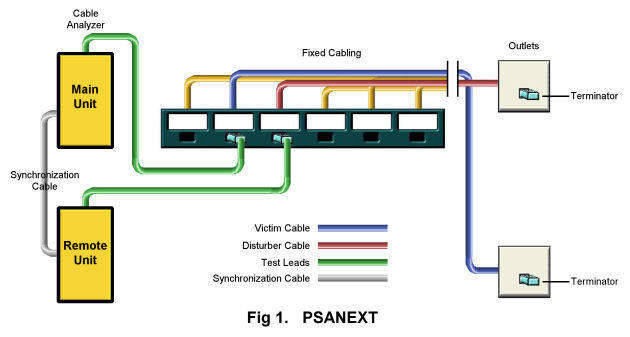
This is where it gets a little complicated! Essentially we need to run NEXT and ACR tests on both ends of a cable whilst simultaneously sending
signals down some of the other cables in the same wiring loom. Then we need to measure any crosstalk
coming from the other cables over the full frequency spectrum of the test range. A full explaination on
this can be found in the eBook.
So we have Cat 6A running at 500MHz and capable of supporting 10 gigabit Ethernet, surely this is now
fast enough for any desktop application? Well, yes it is . . . . in theory!
I read an article years ago by Paul Andres who was at the time the Managing Director of MOD-TAP
World Corporation. In it he discussed the 'Need For Speed' and went into great detail about the fastest
connection speed that a PC could possibly use given that the end user, a human, could concurrently
handle through our senses. High definition video, sounds, voice traffic, file transfer rates, etc. The
conclusion he came to then (probably late 1990's) was that 100MHz would just about be enough, and he
had a good point. So in theory Cat 5e would have just about been enough bandwidth, Cat 6 is definitely
enough and Cat 6A would be more than we could possibly handle. So why do we need Cat 7A and
1000MHz? Well, we as humans don't, not to the desk anyway. But server rooms, data centers and
backbone cabling will be needing as much bandwidth as we can possibly squeeze from a piece of
copper. Faster connections between networks mean we can serve more of those humans at the ends of
the networks per cable. So lets look at Cat 7A.
Cat 7A
There are two types of connector for Cat 7A systems. The first is the version developed by Nexans (IEC
60603-7-71, also available from other manufacturers) and is known as the GG45. This type is
backwards compatible with the RJ45 by the clever use of switch within the jack that changes the pole
layout from 8 contacts in a line (as in the RJ45), to four pairs of contacts at the corners. Ingenious!
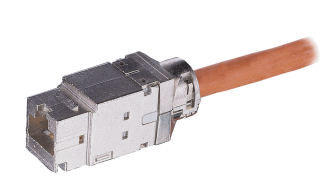
Image courtesy of Nexans
This means that the existing RJ45 type leads and hardware can be used on the cabling plant, and when
the hardware is updated all that is required to go to full 1000MHz is to change the patch leads. This
seems to be an ideal solution as they are capable of pair isolation for the emerging high-speed
technologies. There is a wealth of information for the GG45 on the Nexans website.
Image courtesy of Nexans
The other type of connector is the 'non-backwards compatible' version often referred to as 'TERA' (IEC
61076-3-104). These have the contacts arranged as four pairs of contacts at the four corners to achieve
maximum pair isolation. This type also has a neat trick, the pairs can be used individually for different
applications, so by using single pair, two pair or all four pair plugs, multiple applications can be
supported over one cable. This obviously has a cost benefit, especially when cabling to the desk as one
cable can support 100Mb Ethernet, a phone and a video channel. For more information go to the
Siemons website and look for their info on Category 7/7A - TERA.
The ISO recommends the GG45 as the preferred connector for Data Centre installations, but allows the
'TERA' to be used where cable sharing is more important than backwards compatibility.
An Important Note.
Data Centres consume a lot of power, so there is a movement toward making them more efficient. One
of the ways being discussed is to reduce the need for DSP, this is quite a considerable overhead on
signal transmissions and adds to the heat generated by all networking equipment within the data center.
The theory is, that a good quality fully shielded cabling system is not as susceptible to crosstalk and
alien crosstalk, so it will require less noise cancellation. Less noise cancellation means less electronics.
Less electronics means less heat. Less heat means
less air conditioning. Less air conditioning means
less power consumption. Less power consumption
means a happier planet!
Cable Classifications
There are now so many different types of cable and
classifications that it can be somewhat confusing to
understand what is what. Cat 6/7, Cat 6A/7A, Class
E or F, EA or FA, UTP, FTP, SFTP, U/UTP? . . . . .
Uh! . . . . . Clarification is needed. More on this in the
eBook




Network Cabling Help - Copyright © 2016 - All rights reserved. - Privacy and Cookie Policy

Cat 6A & 7A Cabling systems